

iOS and macOS
formhaus-swift renders Formhaus JSON form definitions on iOS and macOS. FormhausCore is the engine and FormhausUI is the SwiftUI renderer.
Install
In Xcode, add the package URL under Package Dependencies and add FormhausCore and FormhausUI to your app target. In a Package.swift manifest, add this entry to dependencies:
.package(url: "https://github.com/formhaus-dev/formhaus-swift.git", from: "0.5.0")Requires Swift 6.2 and iOS 17 or macOS 14. The package has no JavaScript runtime.
Both ports are 0.x previews. The compatibility table lists the core version of every port release.
| formhaus-swift | @formhaus/core | formatVersion |
|---|---|---|
| 0.5.0 | 1.6.1 | 1.6 |
| 0.4.0 | 1.6.0 | 1.6 |
| 0.3.0 | 1.4.2 | 1.6 |
| 0.2.0 | 1.3.0 | 1.6 |
| 0.1.7 | 1.3.0 | 1.6 |
| 0.1.6 | 1.2.2 | 1.6 |
| 0.1.5 | 1.2.0 | 1.6 |
| 0.1.4 | 1.1.1 | 1.6 |
| 0.1.3 | 1.0.0 | 1.5 |
| 0.1.0 to 0.1.2 | 0.22.0 | 1.5 |
Render a form
Load the definition from JSON with FormDefinition(json:):
let url = Bundle.main.url(forResource: "signup", withExtension: "json")!
let definition = try FormDefinition(json: JSONValue(parsing: Data(contentsOf: url)))
Pass it to FormhausForm with a submit handler:
import FormhausCore
import FormhausUI
import SwiftUI

struct SignupView: View {
    let definition: FormDefinition
    let endpoint: URL

    var body: some View {
        FormhausForm(definition: definition) { values, _ in
            var request = URLRequest(url: endpoint)
            request.httpMethod = "POST"
            request.setValue("application/json", forHTTPHeaderField: "Content-Type")
            request.httpBody = values.jsonData()
            let (data, _) = try await URLSession.shared.data(for: request)
            return SubmitResult(json: try JSONValue(parsing: data))
        }
    }
}
The handler returns a SubmitResult. SubmitResult(json:) reads the response body. A body with "ok": false is a rejection, and its errors object maps field keys to messages:
{ "ok": false, "errors": { "email": "This email is already registered" } }The form shows these messages on the fields. Any other body counts as success.
Restore after the app is closed
The system can end the app while it is in the background. Save the form's snapshot and pass it back to restoring: to bring back the answers, the current step and the skipped steps. Keep the draft in a store that outlives the form view, so the nil sent after a submit is saved too:
@MainActor
final class SignupDraft {
    private let key = "signup.draft"
    private(set) var snapshot: FormSnapshot?

    init() {
        snapshot = UserDefaults.standard.data(forKey: key).flatMap { FormSnapshot.decode($0) }
    }

    func save(_ next: FormSnapshot?) {
        snapshot = next
        UserDefaults.standard.set(try? next.map { try JSONEncoder().encode($0) }, forKey: key)
    }
}

@main
struct SignupApp: App {
    @State private var draft = SignupDraft()

    var body: some Scene {
        WindowGroup { SignupView(draft: draft) }
    }
}

struct SignupView: View {
    let draft: SignupDraft

    var body: some View {
        FormhausForm(
            definition: signup,
            renderer: FormRendererOptions(onSnapshotChange: draft.save),
            restoring: draft.snapshot
        ) { values, _ in
            try await send(values)
        }
    }
}
onSnapshotChange gets a new snapshot at most once per run loop turn, and nil after a successful submit so the draft goes away. A snapshot saved for another form, or for a step the definition no longer has, starts the form fresh and reports snapshot-mismatch through onWarning. Password values are never in a snapshot. A picked file comes back while its copy still exists. The format is in the spec.
Snapshot values can hold personal data. User defaults are not encrypted, so for such forms store the snapshot in the Keychain or in a file with data protection, and delete it when the user signs out.
Choose a look
| Formhaus | iOS system | Your own |
|---|---|---|
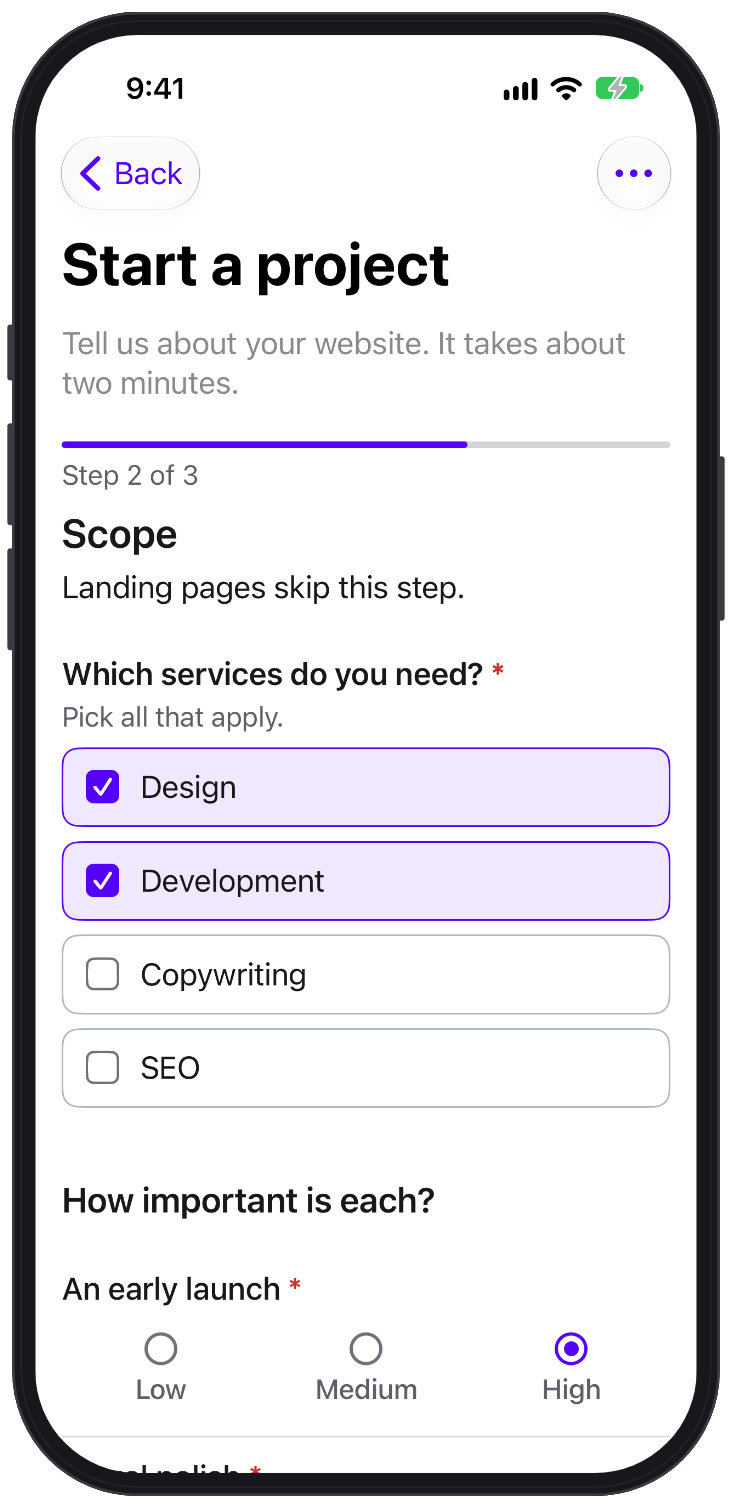 | 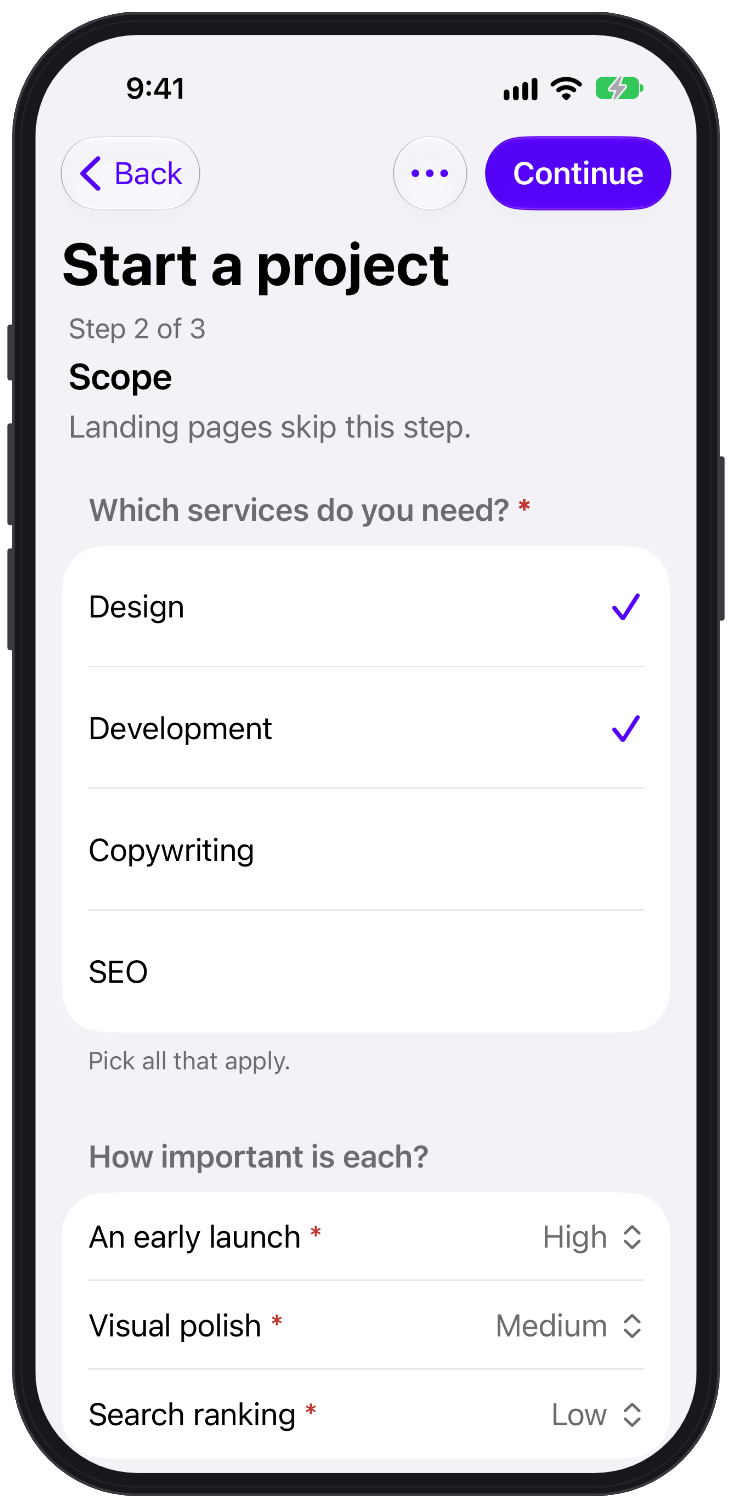 | 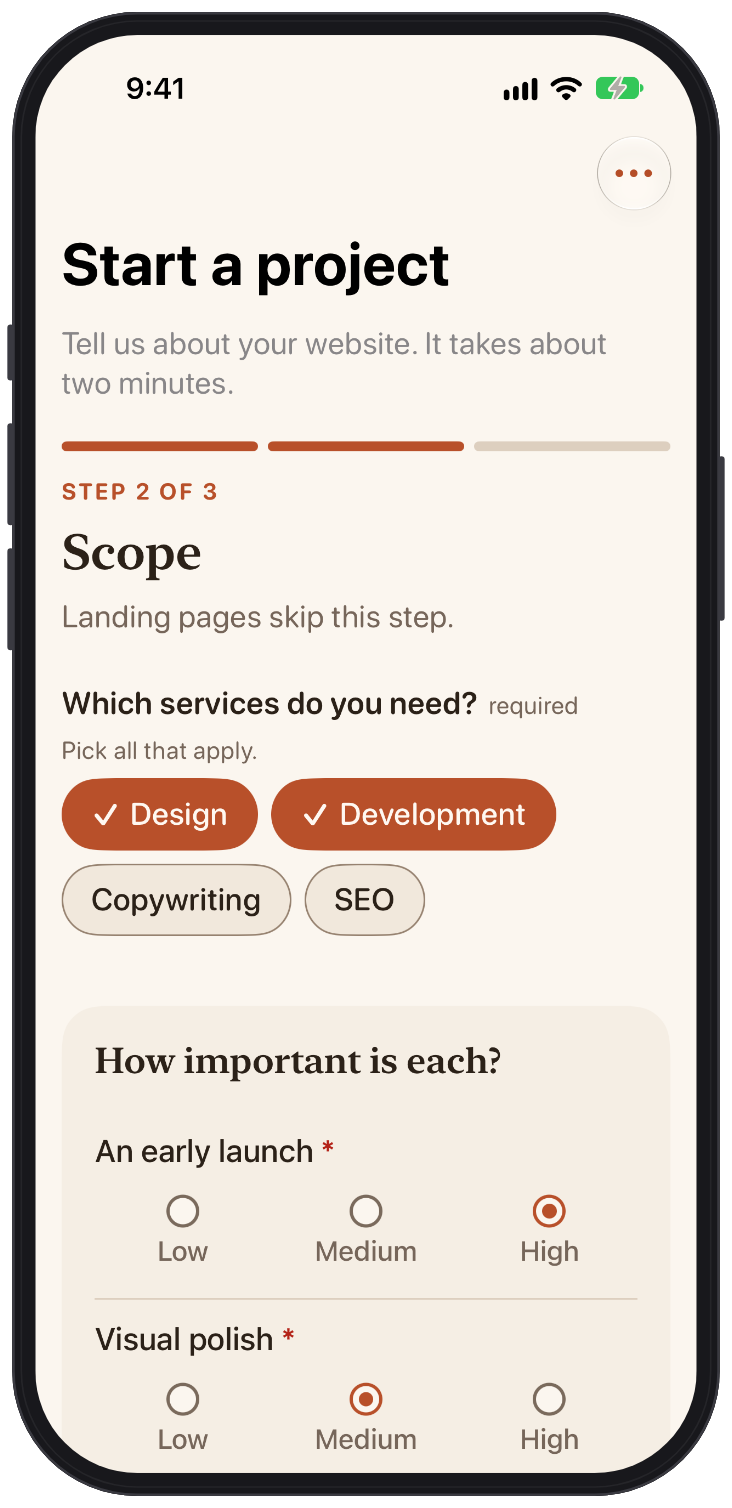 |
- The Formhaus set is
.standard, the default. It matches the web renderers and uses the Formhaus design tokens. .formhausComponents(.system)renders a native grouped form, like a Settings screen.- Register your own SwiftUI views per field type. Types you leave out keep the built-in views. See SwiftUI components.
FormhausForm(definition: definition) { values, _ in .ok }
    .formhausComponents(.standard.field("text") { MyTextField(context: $0) })
Same rules as the web
The Swift engine passes the conformance suite of @formhaus/core. Validation, conditions, routes, answer recall and the submit payload match the TypeScript packages.
Validate submissions on a Swift server with the same definition:
let result = validateSubmission(definition, try JSONValue(parsing: body))For random option order, add the FormhausResearch product and pass Research():
import FormhausResearch

FormhausForm(definition: definition, options: FormEngineOptions(research: Research()), onSubmit: send)
Built-in languages
FormhausCore ships message and label catalogs for en, es, fr, fr-CA, de, pt-BR, it, ja, zh-CN, ru and uk:
let locale = localeChain(Locale.current.identifier(.bcp47)).compactMap(LocaleCatalog.bundled)
FormhausForm(definition: definition, options: FormEngineOptions(locale: locale)) { values, _ in
    try await send(values)
}
Per key, messages wins over the definition's messages, which wins over the catalogs in list order, which win over the built-in English. FormhausForm relabels an open form when locale changes.
Accessibility
The built-in sets label every control for VoiceOver. After a failed submit, VoiceOver focus moves to the error summary or the invalid field. Text sizes follow Dynamic Type. Reduce Motion turns animations off. Tap targets are at least 44 pt. Increase Contrast switches to the high-contrast palette.
Differences
The Swift package does not store drafts itself, the app stores the snapshot. It has no Formhaus Cloud client. See the README for the full list.