How do I design a form in Figma and ship the same form in React?
Formhaus keeps the form in one JSON definition. The Formhaus Figma plugin draws that definition as screens with your design system components, a flow map for branching forms and a clickable prototype. Edits made in the plugin are saved back into the same definition, and FormRenderer from @formhaus/react renders the identical JSON in the app, so the design and the shipped form cannot drift.
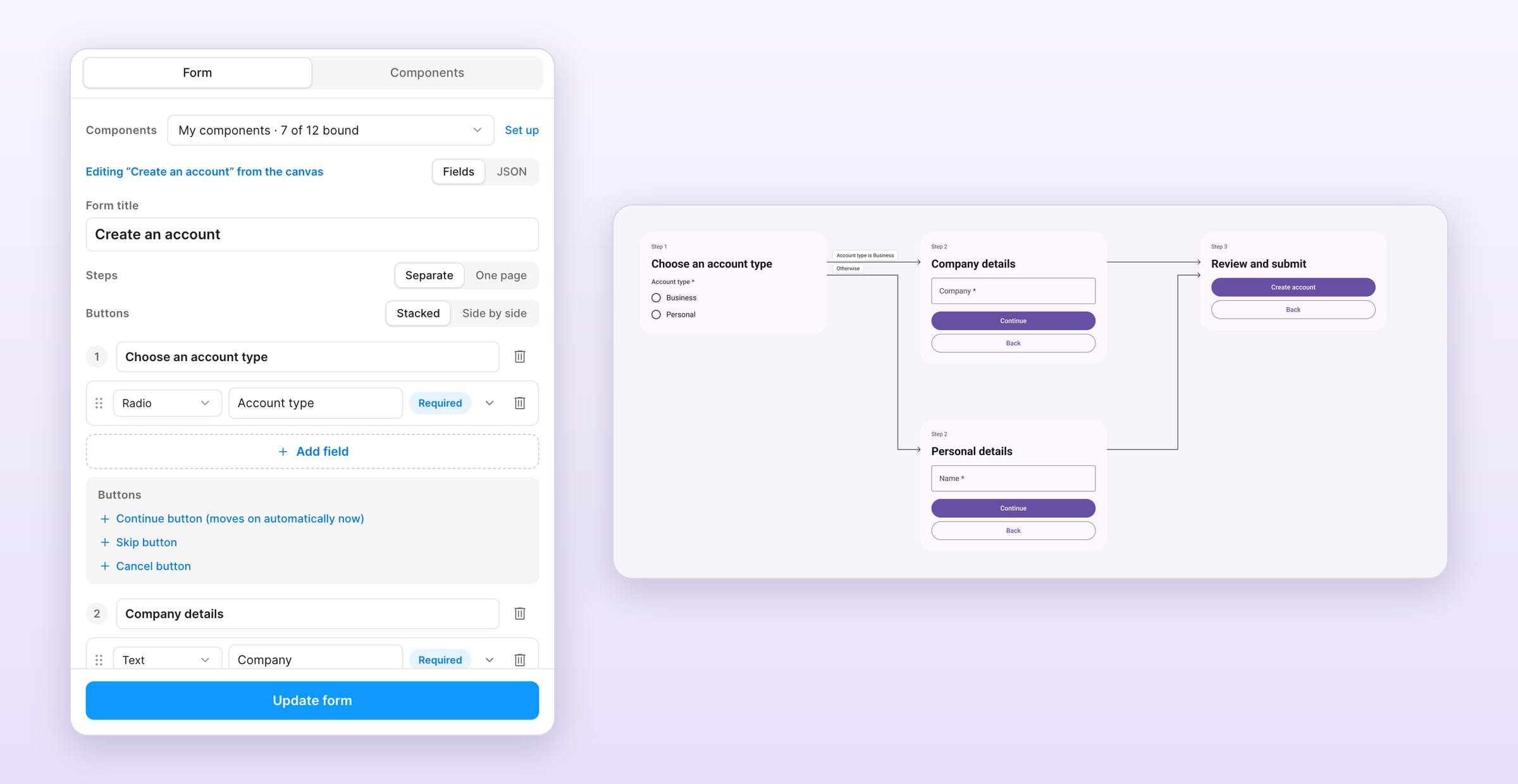
Definition
{
  "$schema": "https://formhaus.dev/schema/form-definition.json",
  "id": "account-flow",
  "title": "Create an account",
  "submit": { "label": "Create account" },
  "steps": [
    {
      "id": "kind",
      "title": "Choose an account type",
      "next": false,
      "fields": [
        {
          "key": "kind",
          "type": "radio",
          "label": "Account type",
          "autoAdvance": true,
          "helperText": "Click or press Space/Enter to continue.",
          "validation": { "required": true },
          "options": [
            { "value": "business", "label": "Business" },
            { "value": "personal", "label": "Personal" }
          ]
        }
      ],
      "routes": [
        { "to": "business", "show": [{ "field": "kind", "eq": "business" }] },
        { "to": "personal" }
      ]
    },
    {
      "id": "business",
      "title": "Company details",
      "fields": [{ "key": "company", "type": "text", "label": "Company", "validation": { "required": true } }],
      "routes": [{ "to": "review" }]
    },
    {
      "id": "personal",
      "title": "Personal details",
      "fields": [{ "key": "name", "type": "text", "label": "Name", "validation": { "required": true } }],
      "routes": [{ "to": "review" }]
    },
    { "id": "review", "title": "Review and submit", "fields": [] }
  ]
}
1. Generate the screens in Figma
- Build and import the plugin from
packages/figma/manifest.json, as described in the plugin guide. - Run Plugins > Development > Formhaus, open JSON on the Form tab and paste the definition.
- Pick Built-in kit or My components to render with your own design system.
- Click Generate form. The plugin creates a frame per step, a flow map with an arrow per route and a prototype.
2. Review the flow and the prototype
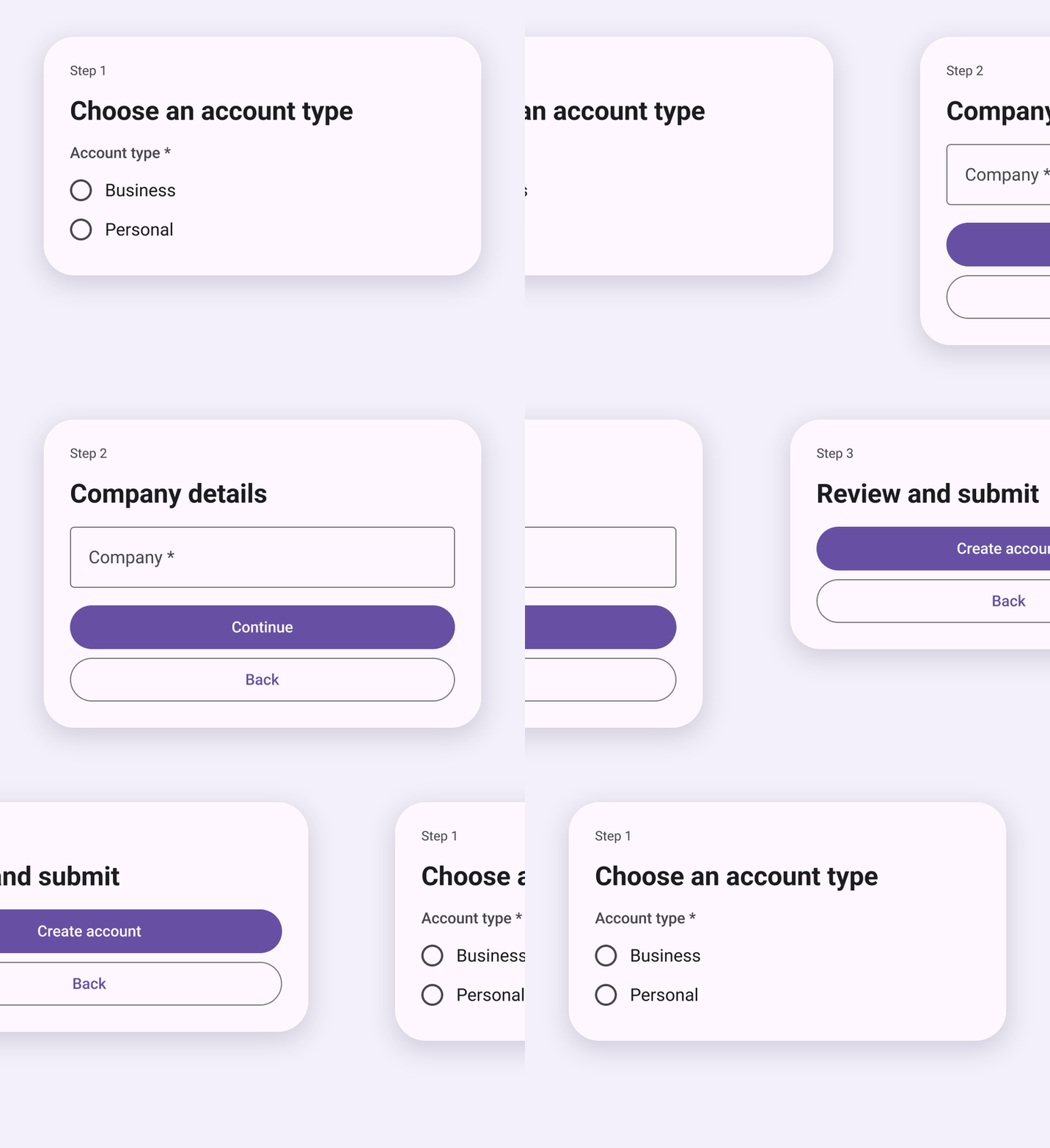
The flow map lays out kind, then business and personal side by side, both converging at review. Each arrow carries its route condition. Present opens the prototype at the first step: choosing Business opens Company details, Continue opens Review.
3. Edit in Figma and copy the JSON back
Select a generated form and the plugin opens it for editing. Designers change labels, helper text, options, required rules, button labels and field order in Fields, then click Update form to redraw it in place. JSON shows the updated definition. Copy it into the repository, replacing account-flow.json.
4. Render the same JSON in React
import { FormRenderer } from '@formhaus/react';
import type { FormDefinition } from '@formhaus/core';
import '@formhaus/core/style.css';
import accountFlow from './account-flow.json';

const definition = accountFlow as FormDefinition;

export function CreateAccount() {
  return (
    <FormRenderer
      definition={definition}
      onSubmit={async (values) => {
        await fetch('/api/accounts', { method: 'POST', body: JSON.stringify(values) });
      }}
    />
  );
}
To use the components the designs were drawn with, pass them through the components prop. Vue uses the same JSON with FormRenderer from @formhaus/vue.
How it works
- Each generated frame stores its definition, so selecting it in Figma reopens the exact JSON the app ships.
- The flow map and prototype come from
routes. The radio withautoAdvancelinks each option to the step its route picks. - Update form keeps step positions you moved on the canvas, redraws the arrows and rewires the prototype.
- The plugin editor keeps conditions, routes and validation rules it does not show, so a round trip through Figma does not drop logic.
- Run
validateDefinition()from@formhaus/corein CI, or the MCP server'svalidate_definition, on JSON copied from Figma before it ships.
Related
- Figma Plugin: install, built-in kits, My components, flow map and prototype
- /formhaus-figma-connect: bind your Figma library components with Claude
- Override default components: render with your own React or Vue components
- Multi-step branching: routes and converge steps in detail